Exclusive consumer research into guest loyalty towards hospitality brands, and how this has been affected by the rising cost of living
Loyal customers are an incredibly valuable asset for any hospitality business, providing a lucrative source of repeat business and resulting revenue as well as brand advocacy that entices new guests in through your doors.
Maintaining a loyal customer-base has always been a key objective for operators, however amidst a cost-of-living crisis resulting in tighter consumer budgets, the criteria leading to a customer becoming, and remaining, loyal have changed. How does loyalty differ between generations? And what role do loyalty schemes play in all of this?
Produced in partnership with CGA by NIQ, we surveyed 5,000 GB hospitality consumers to find the answers.

What's in the report?
- What makes, and breaks, loyalty?
- Differences in loyalty between generations
- How guest loyalty to hospitality has changed as a result of the cost-of-living crisis
- The role loyalty schemes play in maintaining guests’ loyalty to hospitality brands
Subscribe to get the latest news, product announcements and industry updates
Getting ready for Christmas: 4 things to set-up now to help you prepare for the festive period

Time to dust off the tinsel, polish the baubles and fish out the tea urns and trestle tables from storage; the Christmas period is fast approaching! To ensure you’re as prepared as you can be, we’ve listed some suggestions for things you can do now to help everything run as smoothly as possible once the festive season kicks off fully!
Set up your table layout(s) in advance
Come December, due to an influx of larger bookings, you may need to make some changes to your table plan. To ensure you have everything aligned, create this altered layout within the system now and remove any potential last-minute confusion on-site.
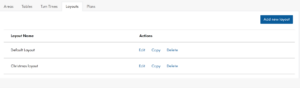
If using Zonal’s Events and Group Bookings solution, you can edit your layouts in Events here: Manage Sites > Select Site > Layouts
Tip: add the layout to a new plan. That way when you create a special day (see later on in this blog) you can easily assign the new table layout to specific days.
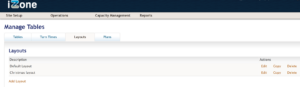
If using Zonal’s Table Management solution, you can achieve this within the Tables Admin platform here: Manage Tables > Layouts
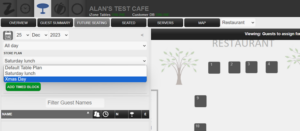
Then edit the requisite layout for that day on the Tables Host platform here: Table Planning > Future Seating > Edit
Configure turn times by occasion
Something to be even more mindful of during the festive period is turn times, to get as many bums on and off seats as quickly as possible. If you’re using a separate Christmas/NYE/Festive Occasion, particularly for smaller and larger party sizes, you may benefit from utilising the hierarchy of turn times, which goes top to bottom as below:
- Occasion (if using Events)
- Area (if using Events)
- Session
- Default
If you wish to give Christmas parties 2 hours on the table, but regular tables 2.5, use the Occasion Turn Time and this will take precedence over any others in the system. Or vice versa, whatever works best for your setup. Equally, you may have a specific area setup for Christmas, which you can set specific Turn Times for and will be used for any bookings that are made where the Occasion carries no Turn Time.
Set up ‘special days’
Open Christmas Day but only for lunch? Open late New Years’ Eve? Closed in the strange week between Christmas and the New Year? We’ve got you covered. Creating ‘Special Days’ allows you make amends to your timeslots and capacity for a single date or a range of dates, without affecting your standard configuration.
If using Zonal’s Events and Group Bookings platform, this can be achieved by navigating to: Manage Capacity > Special Days
Give the special day a name (e.g. Christmas day) and select the date(s) that your special day will apply. You can then untick for ‘available online’ if you wish the day to be unavailable for guests to book. Events will copy a standard day’s availability to create special day time slots, but this can be modified afterwards by selecting ‘edit’ on the newly created special day(s).
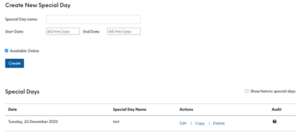
Tip: when editing the new special day(s) you can assign a bespoke table plan and layout by using the dropdown.
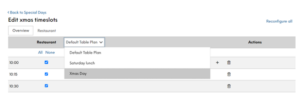
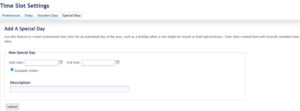
If using Zonal’s Table Management platform, this can be achieved by navigating to: Store Admin > Capacity Management > Special Days
Choose your date(s), give your special day(s) a name and choose if you wish them to be bookable online or not.
Occasion and Menu exclusions (for Events & Group Bookings customers only)
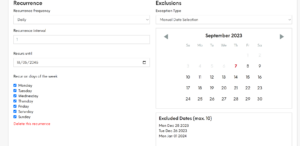
Following on from Special Days, we have exclusions. In both your Occasions and Menus, you can choose up to ten dates to exclude from the availability. If you only have one Occasion and are closed for any dates over December/January, you can use this to prevent any bookings being made on those dates. If you have a separate menu for New Years’ Eve, you can use this to prevent your regular menu showing on that date. The possibilities are (almost) endless!
If you have any questions on the above, or about any of your other Zonal technology, please do get in touch with your Account Manager, or visit the Zonal Product Portal. Don’t have a login? Request one today.
If you’d like to find out more about Zonal Bookings, click here.
By Morgan Jaquiss
Customer Success Consultant at Zonal
Morgan is a Customer Success Consultant at Zonal with over 11 years’ experience working in the hospitality sector. More recently, he has been working closely with Zonal's Bookings platform. Morgan ensures customers are adopting the software and using the technology in the best way that suits the business, drawing on his experience of Operations across multi-site brands.
Related resources


Subscribe to get the latest news, product announcements and industry updates

No-shows in hospitality double from 6% to 12% in 2023
The latest research from Zonal and CGA by NIQ, reveals that the number of consumers not showing up for their reservations in pubs, bars and restaurants has doubled since September last year. A significant 12% of consumers are still not honouring their reservations and not informing venues in advance that they need to cancel.
The latest findings highlight the financial impact that not turning up has on the industry – costing the sector £17.59bn per year in lost revenue alone and the damage is even greater once wasted food and staff costs are taken into account. Unsurprisingly, restaurants are the most severely impacted, as they experience 27% of the cancellations across the industry.
Following the launch of the industry-wide #ShowUpForHospitality campaign that was spearheaded by Zonal in September 2021, the percentage of hospitality customers booking but simply not turning up dropped from 14% at launch to 6% by September 2022. A further 12-months on again, however, and consumers appear to have fallen back into old habits and rates of no-shows have significantly increased once more.
Commenting on the findings, Olivia FitzGerald, Chief Sales and Marketing Officer, Zonal said: “These latest insights show that no-shows are still very much an issue facing the industry and it is a costly one. It is important that we continue our efforts to educate customers on the impact that not honouring bookings has on the industry, as well as finding ways for businesses to help reduce the risk of these no-shows occurring.
“We launched our #ShowUpForHospitality campaign in 2021 in order to shine a light on this issue, change consumer behaviours, as well as start an industry discussion as to how best to combat this long-standing problem. Whilst the industry has made significant steps to reduce these figures, there is still more work to be done. We want to again bring the industry together to raise awareness of the issue, to share knowledge on how to mitigate the problem, as well as encourage customers to always show up for hospitality and help support their local pubs, bars and restaurants.”
CGA by NIQ’s Client Director, Andy Dean said: “This research is incredibly important in highlighting the impact no-shows are having on the hospitality sector, whilst customers might think missing a reservation is only a minor inconvenience for the venue and staff, the wider connotations need to be emphasised to customers, so they appreciate the need to show up for hospitality, support the industry and the workers within it.”
Visit the campaign page to learn more, join the conversation and help spread the message far and wide in order to encourage customers to #ShowUpForHospitality.

Join the conversation and help us make no-shows a thing of the past
No-shows cost the hospitality industry an estimated £17.59 billion in lost sales every year. Join our group of passionate industry supporters to help spread the message far and wide and encourage customers to #ShowUpForHospitality.


Subscribe to get the latest news, product announcements and industry updates
Latest figures reveal 11th October as the most popular day to make a Christmas Day booking in 2023
However, for pre-Christmas get-togethers the most popular day on which to book is the 29th November, new consumer data reveals.
Our latest insights have revealed that 11th October is the most popular day for people making reservations for Christmas Day. Other popular days for making Christmas Day bookings include 5th October (in second place) and 27th September.
For Christmas Day the average booking size is for five people, however the research shows that the average booking size over the entire festive period is for 10 guests.
When it comes to these larger festive bookings, the most popular dates on which to make a reservation are 29th November in the top spot, followed by the 28th, 27th and the 22nd, according to data from 2022.
The findings highlight the importance of promoting Christmas Day offers early in the Autumn and party offers later in the season. Operators should also ensure they have the tools in place to accommodate seamless and simple bookings. According to our research into booking trends, a third of consumers now use social media to book tables and so having a reservation system that can be linked to these online platforms will also benefit operators. Connected technologies and automated systems that send out automatic reminders and confirmation communications will also help prevent no-shows, drive reservations and ultimately boost revenue.
Commenting, Olivia FitzGerald, Chief Sales and Marketing Officer, Zonal, said: “At special times such as Christmas, bookings are an important part of the customer journey. With December being the most important time of the year for many hospitality businesses, promoting Christmas bookings and juggling table plans to maximise availability will help operators make the most of the festive period.
“Sadly, there are still plenty of people who do not honour their reservations and this continues to be an extremely costly challenge for venues. Our #ShowUpForHospitality campaign revealed that no-shows cost the industry £17.6bn a year, which is staggering. With 58% of people now preferring to cancel digitally, sending reminder emails and making it quick and easy for guests to change their bookings is a good way for operators to reduce no-shows.”
Subscribe to get the latest news, product announcements and industry updates
Assessment 5:
Improving the guest experience and driving loyalty
Zonal’s Improving the Guest Experience and Driving Loyalty self-assessment
Answer a few short questions to identify how well your tech helps you to deliver incredible guest experiences that keep your customers coming back time and time again. At the end you’ll get personalised guidance which explains how you can leverage your customer data to offer personalised customer experiences.
Take our other self-assessments to see if you score just as well across other key areas.
1: Reducing administration tasks

Find out if your tech helps you remove manual tasks that sap time and resources, and enables you to improve speed and…
2: Driving revenue
Let’s focus on your bottom line, and examine how your tech helps you to drive additional revenue. In this quick but…
Assessment 4:
Maximising margins

Zonal’s Maximising Margins self-assessment
Answer a few short questions to identify whether your tech helps you squeeze every percentage of profit from your operations. At the end you’ll get personalised guidance to help you maximise your margins.
Take our other self-assessments to see if you score just as well across other key areas.
1: Reducing administration tasks
Find out if your tech helps you remove manual tasks that sap time and resources, and enables you to improve speed and…
2: Driving revenue
Let’s focus on your bottom line, and examine how your tech helps you to drive additional revenue. In this quick but…
Assessment 2:
Driving revenue
Zonal’s Driving Revenue self-assessment
Answer a few short questions to identify whether your tech helps you increase upsell opportunities and open up new revenue streams. At the end you’ll get personalised guidance to help you boost customer spend, both in-venue and at their homes.
Take our other self-assessments to see if you score just as well across other key areas.
1: Reducing administration tasks
Find out if your tech helps you remove manual tasks that sap time and resources, and enables you to improve speed and…
3: Speeding up service
Fast service is a key factor in improving the customer experience and turning more tables. Our third 5-minute…
Assessment 1:
Reducing administration tasks
Zonal’s Reducing Administration Tasks self-assessment
Answer a few short questions to identify whether your hospitality tech helps you combat any admin time-sinks or manual tasks that could be automated. At the end you’ll get personalised guidance to help you maximise your staffing resources and remove the manual grind.
Take our other self-assessments to see if you score just as well across other key areas.
2: Driving revenue
Let’s focus on your bottom line, and examine how your tech helps you to drive additional revenue. In this quick but…
3: Speeding up service
Fast service is a key factor in improving the customer experience and turning more tables. Our third 5-minute…
Getting ready for Christmas pre-ordering with Zonal Bookings
Even though it’s still a few months out, we know that for most hospitality businesses, planning for the busy Christmas season kicks off now. Whilst a busy festive period is something we’re all looking forward to, managing the increased demand can bring with it a number of operational challenges.
Pre-ordering functionality, facilitated through your reservation system, can be an effective way to reduce any admin headaches that can arise when managing orders for your festive bookings. If you’re interested in utilising pre-ordering functionality to help you manage your Christmas bookings, or if you need a quick refresher on how to get everything set up, we’ve put together a quick guide on setting up pre-ordering using Zonal Bookings to help you get off to the best start.
1a. In Events Admin create your Occasion and Menu as far in advance as possible. This way you will be able to take bookings early to maximise capacity without the pressure to finalise the Christmas Pre-Order menu. Ensure the Events Menu is assigned to the Occasion you wish to use.
1b. Create a Booking Rule for Pre-Order. If you want to take deposits or credit guarantees for these bookings, add that to the same booking rule. It is recommended that the rule is set up to trigger on the Menu.
Steps 2 & 3a can be ignored if using existing products.
2. Once the Christmas Menu (Products & Suppliers) has been confirmed and no further changes are going to be made, build and price the products in Aztec. Ensure products are added to the POS and aren’t out of stock. Hidden panels can be used to prevent users from selling these items outside of the Christmas period.
Ensure the Aztec into iOrder overnight sync has completed prior to starting this next step
3a. Now, you’ll need to configure the products in iOrder. This can be completed in Product Manager, or whilst building the menu within Menu Manager.
3b. Build the menu in iOrder Menu Manager by adding the configured products. Ensure that the menu has:
- An availability profile assigned. The parameters for the availability profile can be shortened in Events Admin, so it is recommended that start date is set to the day the menu is created to allow for testing.
- Ensure ‘Pre-order’ is selected in Menu Information under Platform
- The menu must set to ‘Live’
- It is important that the Site(s) & Sales Area(s) ‘Can Place Order’ & ‘Can Browse Menu’. This is found in Site Manager > META > Ordering.
4. Test your Pre-Order Menu prior to opening it for guest selection. Here are the steps to follow for testing:
- Create a duplicate Menu within Events Admin that matches your intended Christmas Pre-order Menu.
- Assign the iOrder Menu you have finalised to the Test Events Menu
- Link the Test Menu to the Christmas Occasion (or Occasion being used for the Pre-Order Christmas Menu).
- Create a booking rule to require a pre-order on your Test Events Menu and set the due date to 1 day.
- Change the Menu to Open for Pre-orders.
- Create a Christmas booking via Events Host or your Booking Widget, selecting the Occasion and Test Events Menu. Check that your booking requirement states you need to place a pre-order as you go through the booking.
- Open the Guest Portal for your booking and check that you can view the menu, then select your menu choices and complete order.
- Go back to Events Host and check the pre-order is now visible (in Chef Reports, Bookings Requirements or Booking History).
- Move the test booking to a date within the next 48 hours.
- On the day of the test booking ensure the pre-order has been sent to Aztec. This can be checked in Events Host but should also be confirmed by checking on site POS (pre-orders are stored in delayed ordering).
5. If everything was successful with your tests – you are ready to go live! When you want your guests to starting pre-ordering, link to your live iOrder menu in Events Menu Pre-Order. We do not advise using a schedule to trigger opening a pre-order, use the “Open for Pre-orders” link instead.
When you click ‘Open for Pre-Orders’, any confirmed bookings will then be sent a ‘Pre-Order Open’ email to prompt them to complete their pre-order. If you have any provisional bookings, they won’t receive the email but they will be able to make their pre-order in the portal.
This email should be configured to push guests to the Guest Portal, however, please remember that this email template isn’t exclusively for Christmas bookings. The Menu Email Template can be used to personalise emails by menu and can be shown in the confirmation emails by use of the dynamic fields. You can always use the Chat function to remind your guests of any outstanding deposits and pre-orders.
Lastly, please note:
- All Email Templates are generic. The Menu Email Template feature can be used to personalise emails by menu and can be shown in the confirmation emails by use of dynamic fields.
- Another way emails can be triggered to the customer and prompt them to complete their pre-order is “Reminder emails” for deposits and pre-orders to encourage the user to enter the Guest Portal.
- When errors occur, it is recommended the Menu is previewed within the Menu Manager in iOrder – this helps to ensure products are configured and priced correctly on Aztec. Quite often menu errors are down to products that are not configured on the POS or priced correctly.
- Remember to delete your test menu or remove all channels so it doesn’t show in house or to customers.
- Your menus must be finalised and checked in iOrder before you open for pre-order. Any changes made after that will not pull down to your guests!
If you have any questions on the above, or about any of your other Zonal technology, please do get in touch with your Account Manager, or visit the Zonal Product Portal. Don’t have a login? Request one today.
If you’d like to find out more about Zonal Bookings, click here.
Related resources
Subscribe to get the latest news, product announcements and industry updates
Unlocking hospitality marketing success: 10 top takeaways from Airship's CRM webinar
In the dynamic landscape of hospitality marketing, the key to success lies in understanding and engaging with your customers effectively. Customer Relationship Management (CRM) systems have emerged as a game-changing tool that not only centralises data but also holds the potential to transform customer interactions into revenue-generating opportunities.
In this article, we summarise the top 10 takeaways from our recent webinar The Importance of CRM, which delved into the world of dedicated hospitality CRM platforms and how these can be used to drive more effective marketing, whether you’re a seasoned industry professional or just stepping into hospitality marketing.
1. A CRM is crucial for your business’s marketing success
A CRM system, or customer relationship management system, enables you to centralise and easily access your customer data, including behaviours and habits, the amount of time a customer has been engaging with your business, personalised purchase records and previous sales interactions. With all of this data in one place, you’re able to quickly and easily segment and access your customer data for your marketing activity.
2. Hospitality CRM platforms help you to maximise revenue
A hospitality CRM will help you maximise revenue by better getting to know your customers. It allows you to implement more personalised marketing and targeted upselling promotions that are more likely to convert, as well as better enabling you to provide efficient customer service through data-driven insights and streamline sales processes, leading to increased revenue and repeat business.
3. CRM systems help to improve data quality
You should prioritise high-quality data over sheer quantity. Quality data provided by a CRM supplies insights into customer behaviours and preferences, allowing you to identify opportunities through trends. It enables you to focus on and nurture the most profitable of your customers, through allocating actions and offers to the highest customer opportunities, leading to maximised customer engagement and revenue.
4. A hospitality CRM can help you build meaningful customer connections
A CRM supplies you with a 360-degree view of your customer, providing a comprehensive understanding of each customer’s engagement with your business, and enabling greater personalisation. By creating more personalised customer experiences through a range of touchpoints using a CRM you are able to acquire valuable proof of presence data and develop customer connections, building greater customer loyalty and encouraging repeat business.
5. A CRM helps you establish value exchange for strong connections
Value exchange is simply how you frame the purpose of your CRM to your customers. It is the process of offering customers benefits such as discounts or offers in exchange for data collection. Developing a concise value exchange using a CRM can boost revenue, facilitate comprehension, and enhance customer redemption. To deliver immediate value through your CRM, you should be generous in your sign-up offers to drive a higher volume of sign-ups.
6. A CRM enables you to balance and better manage active and passive data
A hospitality CRM platform can make it easier for you to manage your active data collection, where a customer gives you information directly to help you get to know them better, and the data you collect on them passively, such as their browsing data, device type, or spending data. It is key to understand the difference between and importance of both active and passive data, and how you can utilise it. This will allow you to optimise opt-in rates using your CRM across varied sources while maintaining a consistent customer journey. The trick is to engage with these guests, and quickly present your value exchange.
7. CRM tools can drive engagement through data insights
Airship’s Proof of Presence tool tells you how often, where and when your guests have visited. This data can be harnessed using a CRM to validate customer engagement providing a clear picture of your customer and their preferences across booking, feedback, visits and more.
8. You can create captivating customer journeys using a CRM
Craft captivating welcome, special occasions and birthday journeys and deliver them using a CRM to increase customer retention. A CRM enables you to gather missing data, steer clear of topics that may not resonate well with different customer groups, and boost revenue through compelling offers.
9. Use insights from your CRM to optimise email frequency
A CRM provides insights into email receipt frequency, helping you ensure you’re staying top-of-mind whilst avoiding overwhelming recipients. A CRM allows you to strike the right balance by aligning your communications with your audience’s wants and needs and building this into a consistent experience across the entire customer journey.
10. A CRM enables personalisation and the consistent portrayal of your brand values
Content quality and brand alignment are paramount for successful email marketing. A CRM can help you focus on aligning your marketing efforts with your brand values, pursuing specific objectives, and sending personalised, purpose-driven emails that are more likely to convert, ultimately driving more spend per visit, increasing quieter times and helping you build a customer database, leading to increased brand loyalty and customer recommendations through consistent and compelling marketing communications.
Want to find out more about how your business can benefit from a CRM? Click here to watch the on-demand Airship x Zonal: The Importance of CRM webinar.
Get in touch today to discover how Airship’s CRM system can help you increase customer loyalty and drive revenue.