




1. Reducing administration tasks

Even though it’s still a few months out, we know that for most hospitality businesses, planning for the busy Christmas season kicks off now. Whilst a busy festive period is something we’re all looking forward to, managing the increased demand can bring with it a number of operational challenges.
Pre-ordering functionality, facilitated through your reservation system, can be an effective way to reduce any admin headaches that can arise when managing orders for your festive bookings. If you’re interested in utilising pre-ordering functionality to help you manage your Christmas bookings, or if you need a quick refresher on how to get everything set up, we’ve put together a quick guide on setting up pre-ordering using Zonal Bookings to help you get off to the best start.
1a. In Events Admin create your Occasion and Menu as far in advance as possible. This way you will be able to take bookings early to maximise capacity without the pressure to finalise the Christmas Pre-Order menu. Ensure the Events Menu is assigned to the Occasion you wish to use.
1b. Create a Booking Rule for Pre-Order. If you want to take deposits or credit guarantees for these bookings, add that to the same booking rule. It is recommended that the rule is set up to trigger on the Menu.
Steps 2 & 3a can be ignored if using existing products.
2. Once the Christmas Menu (Products & Suppliers) has been confirmed and no further changes are going to be made, build and price the products in Aztec. Ensure products are added to the POS and aren’t out of stock. Hidden panels can be used to prevent users from selling these items outside of the Christmas period.
Ensure the Aztec into iOrder overnight sync has completed prior to starting this next step
3a. Now, you’ll need to configure the products in iOrder. This can be completed in Product Manager, or whilst building the menu within Menu Manager.
3b. Build the menu in iOrder Menu Manager by adding the configured products. Ensure that the menu has:
4. Test your Pre-Order Menu prior to opening it for guest selection. Here are the steps to follow for testing:
5. If everything was successful with your tests – you are ready to go live! When you want your guests to starting pre-ordering, link to your live iOrder menu in Events Menu Pre-Order. We do not advise using a schedule to trigger opening a pre-order, use the “Open for Pre-orders” link instead.
When you click ‘Open for Pre-Orders’, any confirmed bookings will then be sent a ‘Pre-Order Open’ email to prompt them to complete their pre-order. If you have any provisional bookings, they won’t receive the email but they will be able to make their pre-order in the portal.
This email should be configured to push guests to the Guest Portal, however, please remember that this email template isn’t exclusively for Christmas bookings. The Menu Email Template can be used to personalise emails by menu and can be shown in the confirmation emails by use of the dynamic fields. You can always use the Chat function to remind your guests of any outstanding deposits and pre-orders.
Lastly, please note:
If you have any questions on the above, or about any of your other Zonal technology, please do get in touch with your Account Manager, or visit the Zonal Product Portal. Don’t have a login? Request one today.
If you’d like to find out more about Zonal Bookings, click here.
In the dynamic landscape of hospitality marketing, the key to success lies in understanding and engaging with your customers effectively. Customer Relationship Management (CRM) systems have emerged as a game-changing tool that not only centralises data but also holds the potential to transform customer interactions into revenue-generating opportunities.
In this article, we summarise the top 10 takeaways from our recent webinar The Importance of CRM, which delved into the world of dedicated hospitality CRM platforms and how these can be used to drive more effective marketing, whether you’re a seasoned industry professional or just stepping into hospitality marketing.
A CRM system, or customer relationship management system, enables you to centralise and easily access your customer data, including behaviours and habits, the amount of time a customer has been engaging with your business, personalised purchase records and previous sales interactions. With all of this data in one place, you’re able to quickly and easily segment and access your customer data for your marketing activity.
A hospitality CRM will help you maximise revenue by better getting to know your customers. It allows you to implement more personalised marketing and targeted upselling promotions that are more likely to convert, as well as better enabling you to provide efficient customer service through data-driven insights and streamline sales processes, leading to increased revenue and repeat business.
You should prioritise high-quality data over sheer quantity. Quality data provided by a CRM supplies insights into customer behaviours and preferences, allowing you to identify opportunities through trends. It enables you to focus on and nurture the most profitable of your customers, through allocating actions and offers to the highest customer opportunities, leading to maximised customer engagement and revenue.
A CRM supplies you with a 360-degree view of your customer, providing a comprehensive understanding of each customer’s engagement with your business, and enabling greater personalisation. By creating more personalised customer experiences through a range of touchpoints using a CRM you are able to acquire valuable proof of presence data and develop customer connections, building greater customer loyalty and encouraging repeat business.
Value exchange is simply how you frame the purpose of your CRM to your customers. It is the process of offering customers benefits such as discounts or offers in exchange for data collection. Developing a concise value exchange using a CRM can boost revenue, facilitate comprehension, and enhance customer redemption. To deliver immediate value through your CRM, you should be generous in your sign-up offers to drive a higher volume of sign-ups.
A hospitality CRM platform can make it easier for you to manage your active data collection, where a customer gives you information directly to help you get to know them better, and the data you collect on them passively, such as their browsing data, device type, or spending data. It is key to understand the difference between and importance of both active and passive data, and how you can utilise it. This will allow you to optimise opt-in rates using your CRM across varied sources while maintaining a consistent customer journey. The trick is to engage with these guests, and quickly present your value exchange.
Airship’s Proof of Presence tool tells you how often, where and when your guests have visited. This data can be harnessed using a CRM to validate customer engagement providing a clear picture of your customer and their preferences across booking, feedback, visits and more.
Craft captivating welcome, special occasions and birthday journeys and deliver them using a CRM to increase customer retention. A CRM enables you to gather missing data, steer clear of topics that may not resonate well with different customer groups, and boost revenue through compelling offers.
A CRM provides insights into email receipt frequency, helping you ensure you’re staying top-of-mind whilst avoiding overwhelming recipients. A CRM allows you to strike the right balance by aligning your communications with your audience’s wants and needs and building this into a consistent experience across the entire customer journey.
Content quality and brand alignment are paramount for successful email marketing. A CRM can help you focus on aligning your marketing efforts with your brand values, pursuing specific objectives, and sending personalised, purpose-driven emails that are more likely to convert, ultimately driving more spend per visit, increasing quieter times and helping you build a customer database, leading to increased brand loyalty and customer recommendations through consistent and compelling marketing communications.
Get in touch today to discover how Airship’s CRM system can help you increase customer loyalty and drive revenue.
With managing and reducing costs front-of-mind for every hospitality operator right now, it’s important to understand the role technology can play, however finding the right tech and knowing what functionality to look out for amongst a sea of different suppliers and solutions can feel like a daunting task.
To help you navigate the world of hospitality tech and identify which solutions you should consider implementing in your business, we sat down with Joel Wilson, Technical Sales Manager at Zonal, to explore how technology can help businesses more effectively manage costs through greater control of their purchasing, improved stock accuracy and greater stock visibility.
Tech’s main role in this area is to help provide visibility. By providing visibility we can help increase accuracy, and having those two things in place will naturally start to reduce waste and costs.
With products in particular, having a procurement or purchase-to-pay platform in-place can really help, by giving full visibility of your cost prices, all the way from the point of ordering to the point of receipt of the goods, to the point of invoicing. Sometimes the cost price we see when we order something and the cost price we’re invoiced for can be two different things, so having the visibility and auditability of that is really important. What’s more, if there’s a difference between the cost price that you’ve ordered and the cost price that you’ve been invoiced for, having a system that flags these so you only need to look at particular invoices, means you can spend less time on the auditing process and more time on the credit resolution stage.
Another area it can help is with digital count sheets, so if we think about the stock audit process, the really annoying and time consuming bit once you’ve done the count is then having to add all of that up, add your count up and then manually enter it in. If you have digital count sheets that let you just automate that process, and import all of those figures in, you then get to spend more time on the important bit which is the analysis side of things – pinpointing where those variances are and why those variances might’ve happened.
An integrated stock system needs to be able to provide real-time visibility of stock holding and then have the ability to manage, maintain and communicate that. One of the key ways of being able to do this is through line checks. They provide a granular view of your stock, and of your stock variances, so you can start to be able to pinpoint where these are occurring and be able to respond immediately to any issues – you’re not having to wait until the end of the week or the end of the month to find out what your stock result is, you can get a real-time view there-and-then and respond.
Having that data in real-time doesn’t restrict your operations either, so you can build it naturally into your working day. If you’re having to wait for data to process overnight you might then only have a set window to do these analysis tasks, but the fact you can do this as and when you need to is really important.
Other solutions operators could look at include recipe modelling, or menu management tools – systems that help you to model your menu items and dishes and provide full visibility over your GPs and your margins, with a full cost-breakdown , including each individual ingredient. So sometimes we know what the overall GP of a dish is, but we don’t necessarily know the makeup of that – but once you know the impact of each ingredient to a dish, you could tweak those to see if there are any potential savings that can be made.
Another key benefit of these tools is the standardisation of your operations. We can spend a lot of time modelling our costs and our dishes, and from a theoretical point of view we know what to expect GP-wise, but sometimes that isn’t delivered at a site level. Building in things such as specification cards, methodology statements and dish photos, gives us the knowledge that when this is passed on to the sites – they not only know what to buy and where from, but they also know how to produce the dishes and ensure things are being executed properly and consistently.
Development menus and temporary stock items can also be built in these tools so, when faced with supply chain issues, you know that if you’re having issues with a current supplier or particular product line, you can start to do the work in the background to help mitigate the impact on your business. Then, once a switch is needed, you can make the ingredients in your dishes live so the switch is seamless.
If you’d like to find out more about how Zonal’s solutions can help you better manage costs and minimise wastage in your business, get in touch today for a technology consultation and one of our experts will be happy to talk you through what’s possible!

Technical Sales Manager at Zonal
Joel has been with Zonal for over 10 years, working across a number of customer-focussed roles including training, systems implementation and account management before joining our sales team to apply his expertise as part of our consultative sales processes. Prior to joining Zonal, Joel spent almost 10 years working in hospitality, managing pubs in and around London, providing him with a breadth of knowledge of the sector.

Being able to effectively manage suppliers, product availability and menus down to an ingredient level will ensure operators are able to tackle rising costs and remain profitable – all while maintaining the same standard of service guests expect.
Implementing smart back-of-house tech solutions which update in real-time and that are fully connected to other tech in the venue, such as the EPoS, will enable operators to make vital cost-cutting decisions based on accurate data from across the entire business. Technology can also streamline and speed up mundane, labour intensive or time-consuming tasks involved with managing inventory and ordering, as well as reduce waste.
For many operators, manually managing inventories and stock is a particularly time-consuming task, and one that can cause a huge admin headache if not done accurately. But it can also be costly to operators in terms of their bottom line and wastage, so utilising robust, feature-rich technology to aid the process will undoubtedly prove to be beneficial.
With this in mind, here are five ways that digital stock and order systems can help operators transform their inventory management:
We all know that having accurate and up to date stock information is a critical part of the business decision making process. As hospitality businesses have increased in operational complexity, so too has the process of calculating the stock. There is a real danger that in modern operations decisions are being made based on inaccurate information generated by conflicting stock management processes.
First and foremost, EPoS integration would be beneficial. At Zonal, our EPoS comes as standard with a complete stock management solution, which provides accurate, real-time data that allows businesses to ensure appropriate amount of stock for each product is being held, enabling operators to set limits on product usage, mark them as ‘unavailable’, as well as run regular line and spot checks and same day stock takes. The system also enables operators to review stock position down to an individual ingredient. This enables operators to avoid the potential for unnecessary overordering and reduces the amount of cash tied up in stock. The real-time data provided by the system also enables operators to keep on top of where and for what reasons they are losing money, whether that be due to drinks being poured in error or staff giving away too many free drinks.
Ensuring sales data is being captured from the till and other ordering channels – and that all this insight is feeding into the stock management system – will enable operators to keep tabs on stock, purchasing and costs, all in real-time, meaning they can be quick and agile in making important cost-cutting decisions. Not only this but having the right solutions in place allows operators to reduce admin time and ensure accuracy of purchase items and recipes by removing the need to re-key the information.
Preparing a stock order is often viewed as a necessary evil. Even with a flawlessly organised stock room, team members can find themselves spending a large amount of time trying to obtain an accurate account of stock needed. Not only that, but this runs the risk of missing key products, or juggling new product lines during a menu change. The outcome of this is inaccurate product levels and availability.
Having feature-rich purchasing and stock control systems that allow staff to create order templates for items that are ordered regularly can be particularly useful to operators. This enables them to re-order popular products quickly, reduces errors being made with the ordering of stock, as well as minimises the risk of over-ordering. Templates can be set up either by an individual operator on-site or at head office level, and pushed out across a whole estate, helping to streamline the ordering process regardless of the size of the operation.
With a few simple clicks of a button, staff can create templates directly in the system – either from scratch or based on previous orders that need to be replicated regularly. What’s more, the list of products to order within the template can be ordered based on the layout of the back bar or storeroom, making it easier to cross-check physical stock in-venue against the ‘regular order’ template, helping to speed up the process and further reduce the potential for unnecessary over-ordering. These templates can then be re-ordered however regularly they need to be, so you can ensure the right amount of stock is always available.
What’s more, with the right system, value-based approvals can be set up as part of the ordering process if needed by a business. This is particularly useful for pubs, bars and restaurants with multiple sites, as orders that exceed a configurable threshold cannot be made until approved by a manager, helping to eliminate unnecessary costs caused by purchasing errors before they occur.
We know that operators are continuously looking to reduce the time spent on repetitive tasks, whilst also maintaining a high degree of accuracy. Whilst having tools to help build a stock order are helpful and do save time, it often remains a laborious task and can certainly be a challenge for inexperienced team members. Suggested ordering is one way to drive a reduction in admin time and to increase stock order accuracy – keeping stock holding values down whilst also ensuring all items remain available. An effective suggested order facility will consider real-time stock holding levels (driven by EPoS integration), minimum stock and par levels and anticipated usage taken from historical usage.
This kind of facility ensures businesses are not needlessly ordering too much stock, driving high stock holding, increased wastage and added burden to operations. It also provides a safety net to prevent underordering which impacts product availability and ultimately revenue.
Having stock in place at the right levels and at the right time is certainly a key element for keeping costs down. But so too is having the right stock from the right source and at the right price. Keeping track of suppliers, catalogues and prices is important to ensuring cost of sales is where it needs to be, however this is becoming an increasingly challenging task to manage.
Back-of-house tech can play a crucial part in this process. It offers operators tools to digitally store large product lists, segment products into manageable catalogues and importantly import prices changes as they happen. These digital processes make managing suppliers simple and ensure teams are always ordering the right products to hit those all-important margins. And with supply chains facing ever increasing challenges, the reduction in admin overhead is a welcome relief for those responsible.
Having a fully digital supplier and ordering process also allows operators to drastically reduce the time and effort needed in processing both invoices and credit notes. The use of ‘invoice matching’ technology eliminates the need to manually reconcile delivery notes and invoices where they both match – leaving only those that have discrepancies. And where discrepancies occur, having a fully digital credit request and acceptance process allows for tighter control and reduces the risk of losing money.
Not only does all this save staff admin time, but it enables operators to also protect and even boost margins.
Technology doesn’t only provide direct operational improvements to your inventory management – it also provides access to a whole host of reporting you can use to make smarter decisions to cut costs, such as helping you quickly identify any potential issues when it comes to stock.
Being able to see a report – in a few clicks of a button – that estimates how may days’ stock you have on hand based on live data makes managing stock levels easier and reduces the risk of waste and overordering too. Zonal’s end-to-end purchasing system, Acquire, also displays discrepancy reports which can help operators or staff easily identify where errors are occurring throughout the ordering process, such as incorrect invoices. This empowers operators to better manage their supplier relationships and cut down on time spent dealing with these issues.
The thing that makes this all possible however, is having an EPoS that is integrated with all the back-of-house and stock-taking tech. Having integrated systems which use the EPoS as the central data hub allows for seamless data sharing and reporting, providing you with one version of the truth for accurate, insightful reporting. This enables operators to be able to very quickly identify where processes across the business can be improved and made more efficient, such as identifying the need for more training for staff or recipes that may need refining to maximise margins, helping to save businesses time as well as money.
Using the right technology to manage both suppliers and stock can help operators manage the level of waste they produce which in turn can save them valuable money, and allowing technology to do the heavy lifting will let you know where those all-important pennies can be saved across the business.
If you’d like to find out more about how our hospitality EPoS and inventory & ordering systems could help you to more effectively manage costs in your business, get in touch today and our team of hospitality technology experts would be happy to show you what’s possible!
Director of Technical Sales at Zonal
Jonathan started his hospitality career over 20 years ago managing venues before moving into a technical training role at Zonal in 2012. With a vast amount of operator knowledge and a passion for technology, Jonathan leads Zonal’s technical sales function. Supporting Zonal's internal teams to ensure customers technical requirements are exceeded, Jonathan’s expertise is pivotal in our customer success process providing advice, recommendations and specialist technical support.
Over 60% of customers research and book online – significantly higher for those booking larger groups or special occasions. Your booking platforms are a gateway to increasing revenue and, if utilised to their full extent, can be a powerful tool in boosting your bottom line.
Here are 11 ways you can utilise your booking platforms to drive revenue from hospitality sales & marketing experts Bums on Seats:
Take another good look at your current online booking journey, or better still, ask someone else to do it for you. Your own ‘secret shopper’. Is there plenty of imagery (people only read 10% of information they see – rocketing to over 60% if accompanied by attractive images of your venue). Ensure that all your spaces are shown separately so that customers can envisage themselves enjoying them, know when they are available and how to book.
Look at your timeslot capacity and ensure this is maximised. Table joins can be utilised to maximise pre-booked capacity.
Take the time to review your whole booking journey, ensure any Covid 19 messaging has been removed along with any booking restrictions.
Tables are often moved from area to area based on demand – your booking system can work on a first come first served basis to guide required layouts.
You can also assign tables based on occasion or booking type.
Itemised upsells at the point of booking are a great way to increase spend per head (SPH). Allowing guests to pre-order a bucket of beers, or bottle of Prosecco for example. Spreading the guest spend in this way is a proven method to increase the overall SPH.
Ensure this is particularly being utilised for occasion bookings such as birthdays.
Ensure you have auto-confirm set up for smaller bookings (we suggest 12pax), allowing guests to make a booking immediately. This not only increases conversation but frees up your sales team to focus on larger enquires and building relationships.
Deposits or card pre-authorisations are a sure-fire way to reduce no-shows. Consider basing these on booking size or occasion type.
Set up your SMS and email reminders for bookings. Use your brand tone of voice for this to not only build excitement for the visit, but also reduce no shows.
Ensure these are set up for any outstanding deposits or pre-orders. Again, this will free up your team to focus less on admin, more on converting those larger enquires!
Ensure your online booking journey is clear for special occasions and key calendar dates.
Have you given them an easy way to get more information before they book? If it’s all there they will be confident about booking with you, but if not, may well go elsewhere. And remember not to leave marketing of key dates too late, people start thinking about booking for special occasions months in advance.
Utilise your systems to send follow up emails prompting feedback and online reviews from guests. Go even further and incentivise repeat visits with your automated follow-ups, to build brand loyalty.
Utilise all your data touch points (Booking System, WIFI, Order & Pay, Feedback Management Tool, EPoS) to integrate and feed into a central CRM system.
This will allow you to build a clear view of who your most loyal guests are, who your lapsed guests are, what occasions they visit for, their most purchased items etc – to enable effective marketing campaigns.
If you’d like to find out more about Zonal Bookings you can browse through some of the great functionality available here, or get in touch today and our team of hospitality technology experts will be happy to talk you through what’s possible.


Choosing the right property management system for your hotel is an important decision that will impact the daily running of your business and can often feel overwhelming. However, with the right knowledge at your fingertips, you can easily make the right decision.
It’s not just about selecting PMS software with the most features that meets your business needs now, it needs to fit with your future plans too. With this in mind, we’ve listed the top features and functionalities to consider when choosing your property management system.
A cloud-based hotel PMS gives you the flexibility to manage all aspects of your business from one platform, on any device, anywhere in the world! You and your team can access real-time data on reservations, check-in/outs, and housekeeping.
Not only that, but you can connect seamlessly to your OTAs with OTA and direct bookings all deposited in one central booking calendar, enabling you to adjust rates based on capacity, eradicating overbookings. You can also access data analytics and sales reports at the touch of a button from any device in any location – all you need is an internet connection!
What’s more, there’s no need to invest in IT specialists, as your PMS provider is responsible for fixing any issues that may arise and you’re also no longer at risk of losing your data.
For all these reasons, a cloud-based PMS tends to be more powerful and cost-effective than an on-site solution. All you pay for is a monthly subscription. But more importantly, reliability and security are paramount.
An intuitive, user-friendly system that includes all the features and functionalities you need to streamline your business should be a priority.
If the PMS can’t perform the basic functions to operate effectively then the price of the system becomes less important. A good hotel property management system should include key functionalities such as front-desk operations, back-office management, housekeeping, revenue management, channel management, data analytics and reporting, marketing suite, and a centralised booking system.
However, all of this becomes irrelevant if you and your staff can’t use the system! A good PMS should be easy-to-use and navigate around. Not only will it improve operational efficiency, but it will also help with staff morale, retention, and training new employees on how to use the system.
What’s more, most PMS software should include the automation of hotel critical tasks. This will further boost operational efficiency by reducing repetitive tasks that were more traditionally completed by staff, freeing-up their time to focus on providing the ultimate guest experience.
Now, more than ever, revenue management is becoming the foundation of running a successful and profitable hotel. And part of a good revenue management strategy is to leverage direct bookings and up-selling opportunities, which without a booking engine, isn’t possible.
Most guests enjoy the convenience of being able to book online quickly and easily, whether direct or through OTAs. Not only does an online booking engine provide guests with an easy-to-use online booking platform for your hotel, but it also transitions traditionally OTA source bookings into direct bookers when looking to stay again.
What’s more, a good revenue management strategy doesn’t just focus on increasing prices, it looks at capturing as much value as possible from every guest through up-sells or extras and developing a strong customer retention base.
Of course, hotel pricing strategies also come into play. For example, dynamic pricing uses real-time data on supply and demand to enable price increases or discounts to ensure occupancy rates remain steady and revenue is maximised.
Other pricing strategies may look at placement. For example, to encourage more direct bookings, and therefore less commission payments often incurred through OTAs, hoteliers may decide to have a lower price for online direct bookings than OTA bookings.
Opportunities to maximise revenue occur throughout the entire guest experience, and most PMS providers can’t provide all elements of the entire guest journey without being open to integrations. By ensuring your PMS provider supports important APIs, you are also future-proofing your business by making certain it can scale with you!
If your PMS doesn’t include a channel manager, booking engine or contactless technology for example, then these are critical PMS requirements and should at least be achievable through API integrations.
Other integrations that can help with your hotel revenue management include:
A big consideration when looking at choosing your hotel PMS software is its reliability and security. It’s imperative that your hotel can rely on its PMS software to ensure the guest experience isn’t compromised. Therefore, one of the questions you should always ask is the average uptime and this should be as close to 100% as possible.
Also check the management and stability of the brand itself. Ensure they are backed by strong ownership to provide peace of mind that the company isn’t going to dissolve anytime soon.
Coupled with the reliability, is also the security of the software. The last thing you need is a security breach to compromise your credibility and guest satisfaction.
Ensure your PMS provider’s payment gateway is PCI-compliant. PCI DSS is a set of security standards designed to ensure all companies that accept, process, store or transmit credit card information maintain a secure environment.
Contactless technology is relatively new to the hospitality and hotel sector and was catapulted into the industry due to COVID-19 and social distancing laws. However, the functionality has become the norm and guests now expect a contactless guest experience because of it.
The goal is to streamline and automate elements of the guest journey, making it more efficient for the guest and hotel. This includes contactless check-in/out, mobile ordering including room service, table reservations, completing secure payments and using mobile keys to unlock room doors.
Not only does this technology provide guests with what they want, it also enables you to make operational savings from reducing front-desk and restaurant staff to improving housekeeping and room assignments meaning less time-consuming trips to the front-desk.
The key to maintaining a competitive advantage is how you analyse or manage your data. We’ve already spoken about how much data plays an important role in your revenue management strategy, and there is an abundance of data available to hotels, so it’s an important functionality when choosing your PMS provider.
Thorough data analysis can provide vital intelligence to help you make better business decisions. Whether that’s improving the guest experience, formulating an effective revenue management strategy, creating personalised marketing messages to increase direct bookings, or leveraging your food and beverage operations, data analytics should be at the heart of your business strategy.
Once you’ve chosen your PMS provider, you want to know that the onboarding and switch-over is going to run as smoothly as possible with zero downtime.
On top of this, staff training and access to training resources for new employees, means that you can relax in the knowledge that your staff can pick-up and run with your chosen PMS software provider.
Likewise, if something goes wrong with your PMS, you want the confidence that you can get in touch with customer support, no matter what time of day.
Demo with a complete hospitality software solution, High Level
Now you’re armed with all the information you need to choose the right PMS provider for your business, put High Level to the test and request a demo today!
One of our hospitality technology experts will happily discuss your requirements and tailor your demo to your specific business needs.
Managing Director at High Level Software
With an intensive understanding and passion for the hotel sector and more than 20 years' of hotel knowledge and expertise in hotel management, operations as well as sales and marketing for brands, Stewart leads Zonal's hotel division.
While third-party booking sites and OTAs can form a valuable part of the marketing mix by increasing brand reach and filling shoulder times, direct bookings offer a wealth of benefits – the most obvious being the opportunity to improve margins which increase RevPAR, but also providing the opportunity to drive longer-term loyalty for your hotel.
Is your website helping or hindering the number of direct bookings you receive? Run through your booking journey as if you were a guest, evaluating how easy it is to browse through your offering, check availability and make a booking. Some key things to look out for here are having too many steps in the booking process, unclear language, complicated systems – or even if it just takes too long to complete!
 Provide up-to-date information
Are all the facilities you offer easily available to view and do images reflect how things currently are? If you have rooms or facilities that are currently unavailable, make sure this is clearly communicated on your website and across any other sources of information to avoid any guest frustrations that may result in disappointment on arrival and damage your brand.
Guests are looking for the peace of mind of knowing their room reservation is secured immediately at the point of booking. Make sure room availability and rates are correct and in-line with those offered on third party sites. This can be achieved easily by integrating your hotel’s property management system (PMS) with your website’s booking engine via a channel manager, allowing you to centrally manage your rooms across all channels from one platform, and avoid overbooking.
Offer preferential rates or extra incentives to encourage guests to book via your website. Not only does this entice guests away from OTAs into booking with you direct, you’ll also be able to capture valuable information, increase opportunities for upselling, and provide added incentives for them to book direct in the future too.
 Highlight how you keep customer information
Trust is a hot topic amongst consumers at the moment, and if guests are confident that you are keeping their information safe, they are more likely to trust your direct booking process. You should clearly communicate how any data is being stored, as well as what you’ll be using it for, demonstrating the value in sharing their data to your guests.
42% of hotel guests say a high level of responsiveness to enquiries and bookings would encourage them to book direct, according to our research, so building a dialogue with guests in the early stages is vital.
Further to the above, make the most of every opportunity to communicate with guests through confirmation emails, reminder messages and offers. Not only will you build trust and provide your guests with peace of mind prior to arrival, these communications also provide valuable opportunities for upselling of experiences and F&B, so make sure you’re utilising these touchpoints to their full potential!
 Reward Loyalty
29% of hotel guests say they are interested in hospitality loyalty schemes that offer personalised rewards. Assess your current loyalty offering – does it meet this demand? If not, the data you gather from direct bookings can help you to develop this by analysing which promotions are working and which could use some refinement. For example, our recent research found 4 in 5 hotel guests said a discount on a return visit would encourage them to book a return trip. Use this insight to deliver tailored messaging that drives repeat custom and direct bookings.
43% of hotel users agree that a button to book a hotel directly from social media accounts would make their booking journey easier. Not only does this help to provide a more convenient journey for many bookers, particularly amongst younger generations, but will also help you drive more bookings and access new groups of guests.
Whilst personal recommendations from friends remains the top source of information for guests when choosing a hotel to stay in, online reviews play a crucial role, with 98% of consumers saying reviews influence their choice of hotel. Common platforms for leaving a review include TripAdvisor and Google, however your own website and social media are also popular places guests go to when looking to leave a review. Sending an email to those who have booked directly with an incentive to leave a review is an effective way of increasing your review presence on these platforms.

Since 2020, when app ordering swept across the UK, it changed the way many hospitality venues served their guests. How to set that up for each individual pub, bar, restaurant etc. has since been something of a conundrum. Should guests collect their own drinks? Is it only for table service and if so, only for food? Or with the intricacies of some food menus, should it only be drinks?
One issue we know our platform users have come against is allocating table capacity for mobile orders, so that their guests have time to sip their wine or eat their fries in peace. As it stands, a venue may have tables available to be reserved – however another guest could seat themselves at one of these tables and use Order & Pay without it allocating that table out on their table management platform. What can then happen is the table is then booked in the meantime and you’re left in a situation with a seated guest unhappy that their table is now reserved, and the guest with the reservation annoyed at the delay to be seated.
For users of our Table Management solution, this issue can be avoided through setting Order & Pay as a Status, configurable as below, wherein Tables will import any recently closed Order & Pay Accounts as a booking, thus ensuring that capacity is allocated to guests and removing the potential for the table to be booked whilst in use.
If you’re running into this problem in your venue and use Zonal’s Table Management solution, this solution can be implemented in three simple steps:
Here’s a step-by-step guide on how to complete this configuration:
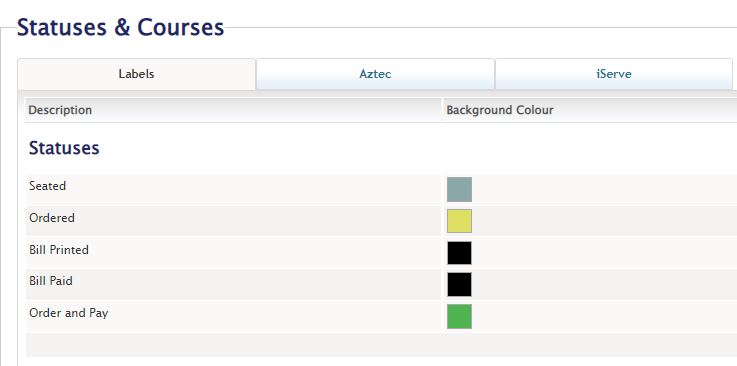
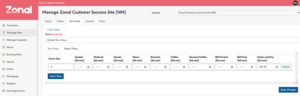
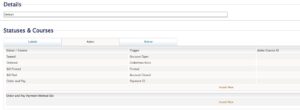
Once these have been configured and activated then the updated ATMS integration will be live. When Aztec and Tables sync up, in addition to any new tables that have been assigned by Aztec, Tables will now import any bookings with recently closed “Order & Pay Accounts” (as defined by accounts which have closed since the last sync, and with a payment method that has been configured as Order and Pay in Tables) and will have the Order and Pay status assigned to them, holding the appropriate Turn Time allocated.
But what about Auto Check Out?
It is recommended that the “Auto Check Out after Order and Pay” (Site Admin > Site Setup Up > Preferences) setting at least matches, if not is slightly longer than the turn time configured for Order & Pay Status. If it is shorter than the turn time, the table will be checked out before the time turn ends and possibly creating the potential for the initial issue to reoccur. If you make it slightly longer than the Turn Time, it gives staff time to clear and relay the table.
It is also highly recommended if using Order & Pay for ‘Auto Check Out after Bill Paid’ to NOT be less than 30 seconds; if this is set to less than 10 seconds, they may not be applied to Order & Pay accounts as it takes ZCF approximately 15 seconds to update their API call.
Next steps?
If you’d like to find out more about this functionality, please see the Product release notes for Tables 2.53 available here on the Zonal Product Portal.
If you’re thinking of implementing a mobile ordering solution in your venue, or if you’d like to find out more about how you can get the most out of your Zonal solutions, get in touch with your Account Manager today!
Customer Success Consultant at Zonal
Morgan is a Customer Success Consultant at Zonal with over 11 years’ experience working in the hospitality sector. More recently, he has been working closely with Zonal's Bookings platform. Morgan ensures customers are adopting the software and using the technology in the best way that suits the business, drawing on his experience of Operations across multi-site brands.

Amidst the current cost-of-living crisis, holidaymakers are expected to look closer to home this year, when planning a getaway. In fact, recent research suggests that 90% of travellers will plan a domestic trip in the next 12 months, with some planning shorter breaks to help keep costs down.
With activities such as caravanning, camping and glamping all popular staycation choices for holidaymakers, how can Holiday Park operators better utilise tech in the F&B arm of their business to capitalise on the opportunities the staycation boom brings, whilst also ensuring they are safeguarding their businesses for the future? Here’s just some of the ways that tech can help.
Despite economic uncertainty, recent data suggests that holiday retail spending will rise this year, and with more and more guests deciding to spend their holidays in UK holiday parks, operators that plan ahead and iterate on previous years’ successes can expect to see results. Technology can play a key role in helping you to achieve this, particularly in your F&B offering. With a fully integrated suite of technology in a park’s restaurants, bars, pubs and cafes, it’s easy to identify what worked well the year before during peak times – from what products sold best in the on-site bar, to what discounts customers took advantage of in the restaurant – providing detailed insights into what your customers respond well to in your hospitality facilities, and helping you to identify opportunities to increase spend. It’s also just as important to identify what didn’t work to ensure you’re offering products your guests want to buy, and that you’re not over-stocking on products that won’t sell well.
However, it’s not just your peak times that you should be looking at – data collected during quieter trading periods can also yield some really useful insights. This data will provide you a complete picture of how your business has been performing, during both the peaks and the troughs, to enable smarter, data-led decision making – such as ensuring you always have your most popular food and drink in stock at the right times, or planning more effective promotions to drive more revenue during the less busy trading periods.
Consumers are becoming more eco-conscious and as result, expect the businesses they buy from to be more socially responsible too. However, when you’re faced with an increase in visitors and a busy park, how can you ensure you keep on top of demand while also prioritising your environmental responsibilities, such as reducing waste? By investing in an effective digital stocktaking solution for your F&B facilities that allows you to look at what’s not being ordered, what’s being wasted in the kitchen and what’s coming back on the plate, you can monitor portion sizes and reduce over-ordering of ingredients. Keeping on top of waste not only helps the bottom line but also helps to achieve sustainability ambitions, as well as ensuring you’re able to keep the value of your offering as reasonable as possible for guests in a year where costs will be front-of-mind when deciding where to spend their holidays.
It’s no secret that data is at the beating heart of any hospitality operation, with holiday parks being no exception, bringing operations together and providing all the tools you need to manage your business successfully and efficiently. It connects the dots between your front and back-of-house, as well as helping you to easily generate an overall picture of your business, delivering you complete operational control – so it’s important that it’s being analysed and used correctly. For example, back-of-house tech that is integrated with EPoS can identify when the kitchen is too busy with in-venue diners and cut off takeaway or click & collect orders automatically, ensuring your in-venue customer experience isn’t affected. This real-time data can also have tangible benefits for your customers during the order journey itself. Fully integrated technology will push live stock availability to all your ordering channels whether it’s a till, handheld ordering device, or online ordering channels, meaning both your staff and customers will always know what’s available to order and what’s out of stock, eliminating a major bugbear for customers before it’s even occurred. A win for both you and your visitors!
A tech-enhanced experience is crucial in achieving a loyal cohort of guests, as it helps in encouraging customers to return to your holiday park. Our research has shown that fewer than one in five (18%) of holiday park guests are currently signed up to a loyalty initiative, but of those who aren’t, nearly half (45%) say they would be interested in signing up to a scheme. With the cost-of-living crisis still impacting overseas travel, here is your opportunity to reap long-term benefits, starting with a loyalty scheme. Investing in an integrated digital loyalty solution will help gain valuable insights that can be gained from harvesting guest data. Visit frequency, guest preferences and spend can all be collected, so you can send tailored deals and rewards to each customer, driving more engagement and sales and increasing the value of your offering to your cost-conscious guests, something that’s sure to keep them coming back year on year.
Zonal has a wide range of technology solutions designed to increase efficiency and help holiday parks become more profitable. Find out more here!

